Showing posts with label DynamoDB. Show all posts

AWS DynamoDB: Automatically delete old records using TTL

AWS DynamoDB storage is inexpensive. AWS charges only for number of Reads and Writes performed on the DynamoDB tables. But, sometimes too much data will causes the Throughput exceptions when we perform a Scan operation.

We can remove the old records which are not required from the table by using some script which delete the records matched to some criteria. But delete operation consume Write capacity.

So for this scenario, AWS provides a concept called Time-To-Live (TTL). TTL for DynamoDB allows you to define when items in a table expire so that they can be automatically deleted from the database without using any Write capacity units. We need to specifty some timestamp in the TTL attribute, so once the timestamp expires, the corresponding item is marked as deleted and removed from the table in next 48 hours.

TTL is useful if you have continuously accumulating data that loses relevance after a specific time period. If you have sensitive data that must be retained only for a certain amount of time according to contractual or regulatory obligations, TTL helps you ensure that it is removed promptly and as scheduled.

Enabling TTL

To enable TTL for a DynamoDB table, there should be a numeric DynamoDB table attribute populated with unix/epoch time to specify the expiration criteria. Next we need to enable the TTL setting on the table. Click on ManageTTL against "Time to live attribute" property for the table in the Overview tab.


Next enter the attribute name in the specified column and click on continue. 


Note: 
  • Enabling TTL requires no additional fees.
  • The TTL attribute should be numeric and we should store the epoch time only in that. If format is wrong, the value is ignored and the item won’t be deleted. TTL attribute is like any other attributes means we care read it, create indexes etc.
  • Enable TTL will takes 1 hour to apply. So, once you have enabled TTL for an attribute, you will not able to disable / change in that time period.

Expiring Items

DynamoDB runs a background scanner that monitors all the items. If the timestamp has expired, the process will mark the item as expired and queue it for subsequent deletion. The expired item will delete in 48 hours from the table permanently. So if you read data from the table, it will return the items which are marked for deletion but not deleted from table yet. We need to filter the items using filter expression that returns only items where the Time To Live expiration value is greater than the current time in epoch format.

Changing / Disable TTL   

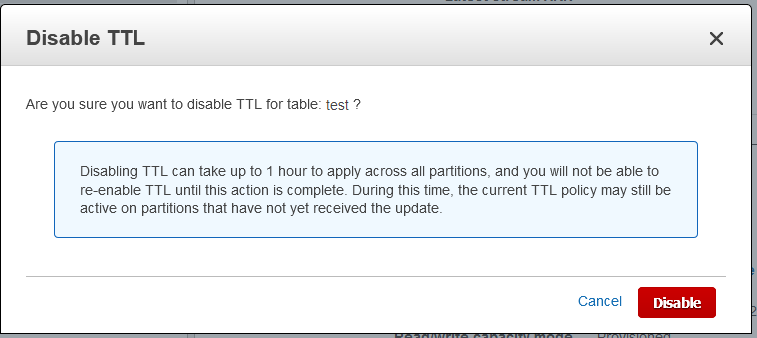
If you want to disable TTL for a table, just click on ManageTTL -> Disable.


To specify a different TTL attribute, you need to disable TTL for the table first, then you can re-enable TTL with a new TTL attribute. But disable or enable TTL will takes almost 1 hour to effect.

We can also Enable or Disbale the TTL attribute using AWS CLI.
For more information on AWS DynamoDB TTL, click here.

AWS: Set DynamoDB Table name based on environment

In DynamoDB we can differentiate the tables per environment by prefixing the tables with environment.
e.g. A table "Account" can be created per environment as "Dev_Account", "QA_Account","UAT_Account".

But in the API, we cannot use table names separately for each environment. So, for this situation, we can specify the prefix for the tables globally using the "TableNamePrefix" property on the "DynamoDBContextConfig" object in Startup class under ConfigureServices method as below

var tableNamePrefix = Configuration.GetSection("DynamoDBConfig")["tableNamePrefix"];
if (!string.IsNullOrEmpty(tableNamePrefix))
    AWSConfigsDynamoDB.Context.TableNamePrefix = tableNamePrefix;

Here, we are getting the table prefix from the configuration file and setting the value as dynamodb table prefix globally.

AWS DynamoDB Helper class - C# and .NET Core

As per Amazon, DynamoDB is a key-value and document database that delivers single-digit millisecond performance at any scale. It's a fully managed, multi-region, multi-master database with built-in security, backup and restore, and in-memory caching for internet-scale applications.
With DynamoDB, you can create database tables that can store and retrieve any amount of data, and serve any level of request traffic. You can scale up or scale down your table's throughput capacity without downtime or performance degradation, and use the AWS Management Console to monitor resource utilization and performance metrics.

Amazon DynamoDB provides on-demand backup capability. It allows you to create full backups of your tables for long-term retention and archival for regulatory compliance needs.

DynamoDB automatically spreads the data and traffic for your tables over a sufficient number of servers to handle your throughput and storage requirements, while maintaining consistent and fast performance. All of your data is stored on solid state disks (SSDs) and automatically replicated across multiple Availability Zones in an AWS region, providing built-in high availability and data durability.

AWS provides 3 types of interfaces to work with DynamoDB

1) Low-Level Interfaces

Every language-specific AWS SDK provides a low-level interface for DynamoDB, with methods that closely resemble low-level DynamoDB API requests.
Availability: A low-level interface is available in every language-specific AWS SDK.

2) Document Interfaces

Many AWS SDKs provide a document interface, allowing you to perform data plane operations (create, read, update, delete) on tables and indexes. With a document interface, you do not need to specify Data Type Descriptors; the data types are implied by the semantics of the data itself. These AWS SDKs also provide methods to easily convert JSON documents to and from native DynamoDB data types
Availability: Document interfaces are available in the AWS SDKs for Java, .NET, Node.js, and JavaScript in the browser.

3) High-Level or Object Persistence Interface

Some AWS SDKs provide an object persistence interface where you do not directly perform data plane operations. Instead, you create objects that represent items in DynamoDB tables and indexes, and interact only with those objects. This allows you to write object-centric code, rather than database-centric code. 
Availability: Object persistence interfaces are available in the AWS SDKs for Java and .NET

Following is the helper class for working with DynamoDB in .net Core with C# for Object Persistence model. AWSSDK.DynamoDBv2 is the nuget package required to work with DynamoDB.

using Amazon.DynamoDBv2;
using Amazon.DynamoDBv2.DataModel;
using Amazon.DynamoDBv2.Model;
using Amazon.Runtime;
using log4net;
using System;
using System.Collections.Generic;
using System.Threading;
using System.Threading.Tasks;

namespace UtilityServices.DynamoDB
{
    public class DynamoDBHelper
    {
        AmazonDynamoDBClient client;
        private static readonly ILog _logger = LogManager.GetLogger(typeof(DynamoDBHelper));
        private readonly string accessKeyId, secretKey, serviceUrl;

        public DynamoDBHelper(string accessKeyId, string secretKey, string serviceUrl)
        {
            this.accessKeyId = accessKeyId;
            this.secretKey = secretKey;
            this.serviceUrl = serviceUrl;
            client = GetClient();
        }

        /// <summary>
        /// Initializes and returns the DynamoDBClient object
        /// </summary>
        /// <returns></returns>
        private AmazonDynamoDBClient GetClient()
        {
            if (client == null)
            {
                try
                {
                    // DynamoDB config object
                    AmazonDynamoDBConfig clientConfig = new AmazonDynamoDBConfig
                    {
                        // Set the endpoint URL
                        ServiceURL = serviceUrl
                    };
                    client = new AmazonDynamoDBClient(accessKeyId, secretKey, clientConfig);
                }
                catch (AmazonDynamoDBException ex)
                { _logger.Error($"Error (AmazonDynamoDBException) creating dynamodb client", ex); }
                catch (AmazonServiceException ex)
                { _logger.Error($"Error (AmazonServiceException) creating dynamodb client", ex); }
                catch (Exception ex)
                { _logger.Error($"Error creating dynamodb client", ex); }
            }
            return client;
        }

        /// <summary>
        /// Creates new table in DynamoDB
        /// </summary>
        /// <param name="tableName">name of the table to create</param>
        /// <param name="hashKey">Hash key name</param>
        /// <param name="haskKeyType">Hask key type</param>
        /// <param name="rangeKey">range key name</param>
        /// <param name="rangeKeyType">range key type</param>
        public async Task CreateTable(string tableName, string hashKey, ScalarAttributeType haskKeyType, string rangeKey = null, ScalarAttributeType rangeKeyType = null)
        {
            // Build a 'CreateTableRequest' for the new table
            CreateTableRequest createRequest = new CreateTableRequest
            {
                TableName = tableName,
                ProvisionedThroughput = new ProvisionedThroughput
                {
                    ReadCapacityUnits = 5,
                    WriteCapacityUnits = 5
                }
            };
            List<KeySchemaElement> schemaElements = new List<KeySchemaElement>();
            List<AttributeDefinition> attributeDefinitions = new List<AttributeDefinition>();

            schemaElements.Add(new KeySchemaElement
            {
                AttributeName = hashKey,
                KeyType = KeyType.HASH
            });

            attributeDefinitions.Add(new AttributeDefinition
            {
                AttributeName = hashKey,
                AttributeType = haskKeyType
            }
            );

            if (!string.IsNullOrEmpty(rangeKey) && !string.IsNullOrEmpty(rangeKeyType))
            {
                schemaElements.Add(new KeySchemaElement
                {
                    AttributeName = rangeKey,
                    KeyType = KeyType.RANGE
                });
                attributeDefinitions.Add(new AttributeDefinition
                {
                    AttributeName = rangeKey,
                    AttributeType = rangeKeyType
                }
               );
            }

            try
            {
                var client = GetClient();
                await client.CreateTableAsync(createRequest);
                bool isTableAvailable = false;
                while (!isTableAvailable)
                {
                    Thread.Sleep(2000);
                    var tableStatus = await client.DescribeTableAsync(tableName);
                    isTableAvailable = tableStatus.Table.TableStatus == "ACTIVE";
                }
            }
            catch (Exception ex)
            {
                _logger.Fatal($"Error: failed to create the new table:{ex.Message}");
                return;
            }
        }

        /// <summary>
        /// Get all the records from the given table
        /// </summary>
        /// <typeparam name="T">Table object</typeparam>
        /// <returns></returns>
        public async Task<IList<T>> GetAll<T>()
        {
            var context = new DynamoDBContext(GetClient());
            // Here we are passing the ScanCoditions as empty to get all the rows
            List<ScanCondition> conditions = new List<ScanCondition>();
            return await context.QueryAsync<T>(conditions).GetRemainingAsync();
        }

        /// <summary>
        /// Get the rows from the given table which maches the given key and conditions 
        /// </summary>
        /// <typeparam name="T">Table object</typeparam>
        /// <param name="keyValue">hash key value</param>
        /// <param name="scanConditions">any other scan conditions</param>
        /// <returns></returns>
        public async Task<IList<T>> GetRows<T>(object keyValue, List<ScanCondition> scanConditions = null)
        {
            var context = new DynamoDBContext(GetClient());
            DynamoDBOperationConfig config = null;

            if (scanConditions != null && scanConditions.Count > 0)
            {
                config = new DynamoDBOperationConfig()
                {
                    QueryFilter = scanConditions
                };
            }
            return await context.QueryAsync<T>(keyValue, config).GetRemainingAsync();
        }

        /// <summary>
        /// Get the rows from the given table which maches the given conditions 
        /// </summary>
        /// <typeparam name="T"> Table object</typeparam>
        /// <param name="scanConditions"></param>
        /// <returns></returns>
        public async Task<IList<T>> GetRows<T>(List<ScanCondition> scanConditions)
        {
            var context = new DynamoDBContext(GetClient());
            return await context.ScanAsync<T>(scanConditions).GetRemainingAsync();
        }

        /// <summary>
        /// Gets a record which matches the given key value
        /// </summary>
        /// <typeparam name="T">Table object</typeparam>
        /// <param name="keyValue">Hash key value</param>
        /// <returns></returns>
        public T Load<T>(object keyValue)
        {
            var context = new DynamoDBContext(GetClient());
            return context.LoadAsync<T>(keyValue).Result;
        }

        /// <summary>
        /// Saves the given record in the table
        /// </summary>
        /// <typeparam name="T">Table object</typeparam>
        /// <param name="document">Record to save in the table</param>
        /// <returns></returns>
        public async Task Save<T>(T document)
        {
            var context = new DynamoDBContext(GetClient());
            await context.SaveAsync(document);
        }

        /// <summary>
        /// Deletes the given record in the table
        /// </summary>
        /// <typeparam name="T">Table object</typeparam>
        /// <param name="document">Record to be removed from the table</param>
        /// <returns></returns>
        public async Task Delete<T>(T document)
        {
            var context = new DynamoDBContext(GetClient());
            await context.DeleteAsync(document);
        }

        /// <summary>
        /// Saves batch of records in the table
        /// </summary>
        /// <typeparam name="T">Table object</typeparam>
        /// <param name="documents">Records to be saved</param>
        /// <returns></returns>
        public async Task BatchSave<T>(IEnumerable<T> documents)
        {
            var context = new DynamoDBContext(GetClient());
            var batch = context.CreateBatchWrite<T>();
            batch.AddPutItems(documents);
            await batch.ExecuteAsync();
        }

        /// <summary>
        /// Deletes batch of records in the table
        /// </summary>
        /// <typeparam name="T">Table object</typeparam>
        /// <param name="documents">Records to be delete</param>
        /// <returns></returns>
        public async Task BatchDelete<T>(IEnumerable<T> documents)
        {
            var context = new DynamoDBContext(GetClient());
            var batch = context.CreateBatchWrite<T>();
            batch.AddDeleteItems(documents);
            await batch.ExecuteAsync();
        }
    }
}

Happy Coding 😊!